Your public profile is one of the most important parts of Champfy. Other players use it to learn about you, see your level, and decide whether you are a good match.
Until now, the fastest path was easy to miss: Avatar → Settings → Public Profile card. That works, but it is a lot of tapping when you just want to update a photo, fix your level, or fill in personal details.
What changed
Open your avatar menu from any logged-in page. Below Settings, you will see three new shortcuts:
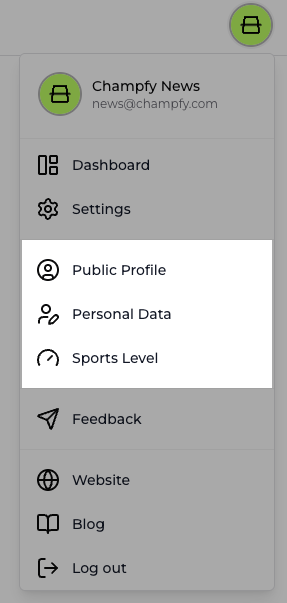
- Public Profile opens your profile editor at Settings → Public Profile
- Personal Data opens Settings with the Personal Data sheet ready
- Sports Level opens Settings with the Sports Level sheet ready
Each shortcut uses the same icons as the Settings hub cards, so the menu feels familiar the first time you use it.
Settings is still your account hub
The top-level Settings item is unchanged. Use it when you want the full account page: notifications, facilities, billing, and everything else in one place.
The Public Profile card on Settings is still there too. Think of the avatar shortcuts as the fast lane, and Settings as the full menu.
Try it today
Tap your avatar, pick the profile area you want to update, and get back to finding partners faster.
Ready to polish your profile?
Open Public Profile from your avatar menu and make sure other players see the best version of you.