Champfy is for finding partners and setting up games. Most chats go fine. When one does not, you now have Block and Report on the web, from chat and from a player's public profile.
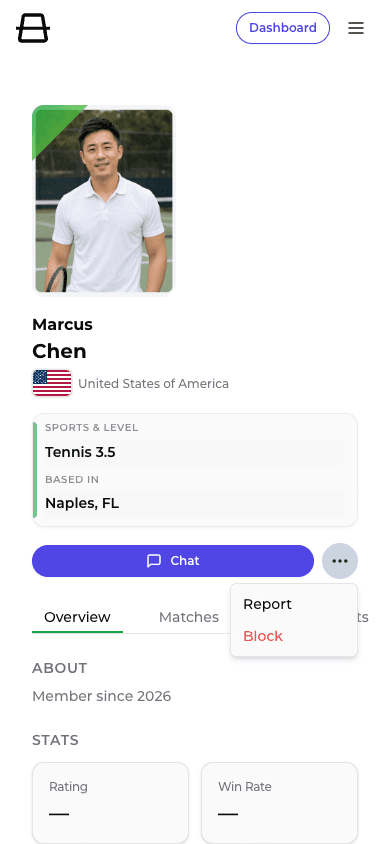
Block a player
Open the menu in a chat thread, or open the actions menu on someone's public profile, then choose Block. Confirm once.
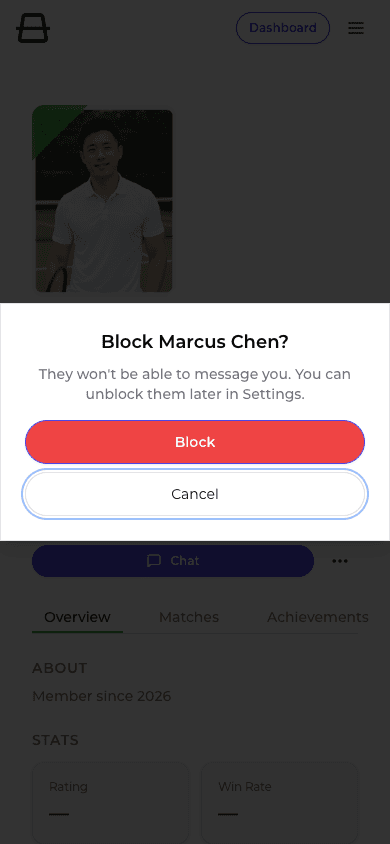
After you block them:
- They cannot message you
- Existing chat threads stay visible, but sending is locked
- Neither of you shows up for the other in Find Players
- You can unblock anytime under Settings > Blocked players
Blocking is for you. It does not send them a notification.
Report a player
Choose Report from the same places. Pick a reason, add optional details, and submit.
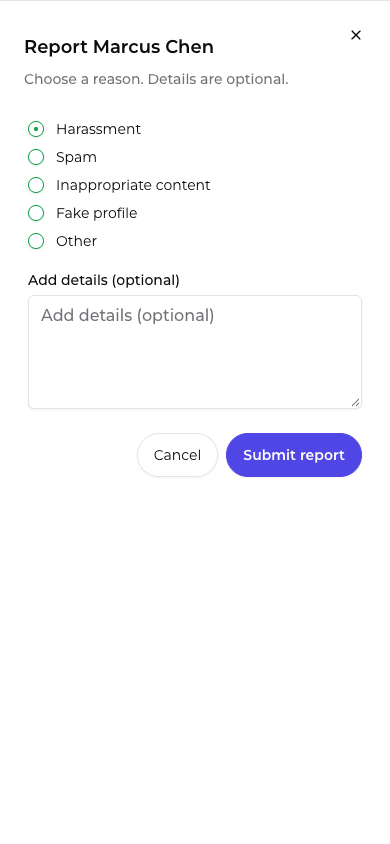
Reasons you can choose:
- Harassment
- Spam
- Inappropriate content
- Fake profile
- Other
You get a simple thanks when the report is received. We do not show moderator status or case tracking in the app.
Reporting and blocking are separate. You can do either, or both.
Where to find it
In chat
Open a conversation, open the menu, then choose Block or Report.
On a player's profile
Open their public profile, open the actions menu next to Chat, then choose Block or Report.
In Settings
Go to Blocked players to see who you have blocked and unblock someone when you are ready.
Common questions
Does blocking also report them?
No. Block controls messaging and Find. Report flags them for Champfy to review. Use one or both.
Will they know I blocked them?
We do not notify someone when you block them.
Can I undo a block?
Yes. Open Settings > Blocked players and unblock them. Messaging can work again after that.
What happens after I report someone?
We review reports. You will not get case updates in the app for now.
Is this available on the Champfy iOS app?
This What's New covers Block and Report on the Champfy website. Use chat or a player's profile on the web when you need them today.
Try it when you need it
You should not need these often. When you do, they are right where the conversation happens: in chat, on a profile, and under Settings for anyone you have blocked.
Find partners the usual way
Search for players near you. If a conversation goes wrong later, Block and Report are ready in chat and on their profile.